

The Monitoring that saves you at 3 AM: Why Azure Log Analytics Isn’t Optional – insights from Alexandru Ivanov at EPAM Romania

At EPAM Romania, where complex, large-scale cloud environments are part of everyday delivery for global clients, Alexandru Ivanov’s approach to Azure Log Analytics highlights a critical shift: treating monitoring not as a technical afterthought, but as a business enabler. His implementation focuses on three key benefits: cost control, proactive incident prevention, and sustained operational resilience by aligning monitoring with real business impact rather than default metrics.
In a fast-growing Romanian IT market, where EPAM is recognized as a global leader in AI transformation engineering and integrated consulting, this disciplined approach reflects the maturity required to support enterprise-grade systems at scale. With strong local capabilities in Cloud, Data and DevOps, EPAM Romania consistently helps organizations move beyond “set and forget” configurations toward optimized, insight-driven operations ensuring that when alerts do come at 3 AM, they are actionable, relevant, and, ideally, already anticipated.

From a technical standpoint, Alexandru Ivanov – Lead Systems Engineer at EPAM Romania, with over 20 years of experience in IT, specializing in Azure Cloud and GitHub and a Microsoft Certified Azure Solutions Architect Expert, with a growing focus on Artificial Intelligence, translates this mindset into a structured Azure Log Analytics strategy.
The Efficiency Trap
The problem is rarely ambition. Most enterprises know what they want from AI: faster service, higher productivity, smarter decisions, better experiences and stronger business performance.
The gap is execution.
When teams move to Azure, monitoring usually lands in the "we'll fix it later" pile. The logic makes sense at the time: get workloads running first, prove business value, then improve. So Log Analytics workspaces get created with defaults. Diagnostic settings point to "all logs" because nobody wants to miss something. Alerts cover the obvious — VMs down, apps crashing — and everything else becomes background noise.
For a while, it works. Until it doesn’t.
Alexandru Ivanov – Lead Systems Engineer at EPAM Romania
The problem isn't incompetence; it's a phase most cloud migrations go through: speed and cost-cutting take priority; monitoring gets treated as overhead. But deferred decisions have a way of surfacing on their own schedule. The bill arrives. The cap gets hit. The team realizes that Azure's defaults aren't designed for any specific workload — they're designed to capture everything, everywhere. And in a consumption pricing model, "everything" gets expensive fast.
What the Data Shows
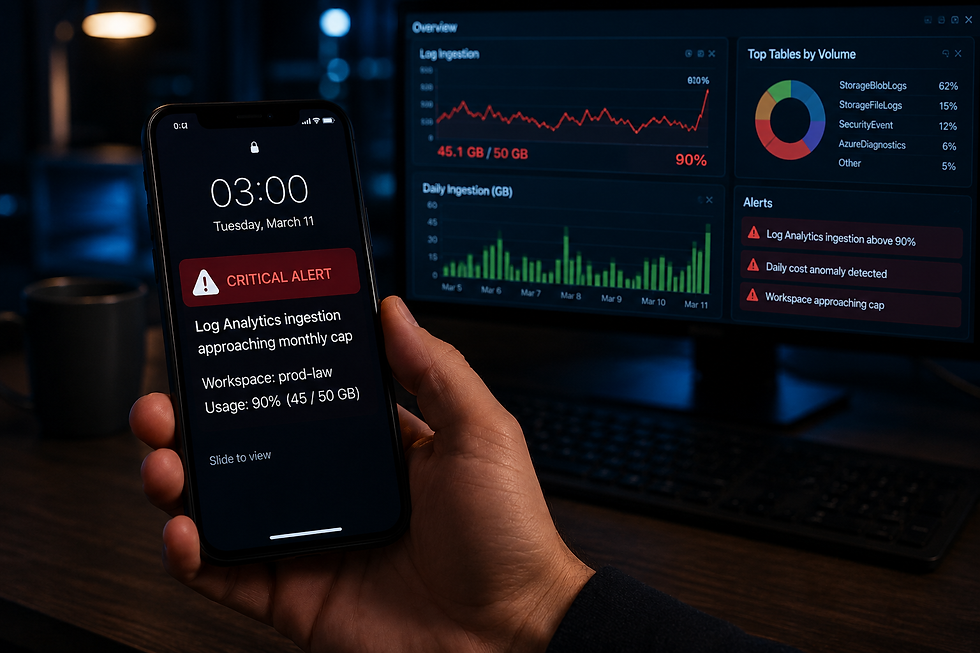
In March 2026, a mid-sized company running Azure workloads hit their 50 GB monthly cap on day 20. No traffic spike. No security incident. Just StorageBlobLogs — a diagnostic category most teams forget exists — ingesting a tiny amount per day, across dozens of storage accounts.
Each entry was negligible. Together they consumed 90% of the monthly budget before anyone ran the numbers:
Date | Total Ingestion (GB) | Top Contributor | Daily Cost (USD) |
2026-03-11 | 0.0000168 | StorageBlobLogs | $0.0000091 |
2026-03-10 | 0.0000505 | StorageBlobLogs | $0.0000438 |
2026-03-09 | 0.0000592 | StorageBlobLogs | $0.0000522 |
The numbers look small. Multiplied across hundreds of resources, over thirty days, at $2.30 per GB after the first 5 GB free, they aren't. [1]
The team had alerts. Just not for ingestion volume, or table-level breakdowns, or the slow creep of "normal" data that turns abnormal when you do the math. By day 20, the workspace stopped accepting new logs. Application insights went blind. Security audit trails disappeared.[2]

What to watch
Microsoft documents dozens of metrics.[1] The harder question is which one matters. Based on real incidents:
· Ingestion volume per day. Set alerts at 50%, 75%, and 90% of your monthly cap, pro-rated by day. If you burn half your budget by day 10, you need to know on day 10.
· Table-level breakdown. StorageBlobLogs isn't the only culprit. AzureDiagnostics, SecurityEvent, and custom logs can all surprise you. A weekly breakdown by table tells you where your budget is going.
· Daily cost trends. Anomaly detection on daily spend catches both the sudden spike (a new resource flipped to verbose logging) and the slow creep (a hundred small logs adding up over weeks).
· Workspace health. Log Analytics has its own health metrics — ingestion latency, query performance, and data retention. These tell you whether your monitoring infrastructure is functional when you actually need it.
· Business-relevant thresholds. Not "CPU above 80%." Ask: what does failure look like for this specific workload? What metric, if crossed, means customers are affected? Monitor that.
The common thread: watch the things that, if they broke, would wake you at 3 AM. Everything else is noise.
[1] Microsoft Learn. (2026). Best practices for Azure Monitor Logs. (link)
[2] Pump. (2026). Azure Monitor Pricing: Complete Cost Guide for 2026. (link)
[3] Microsoft Learn. (2025). Architecture Best Practices for Log Analytics - Azure Well-Architected Framework. (link)
Why this is a trust problem
When monitoring fails, you don't just lose visibility. You lose the ability to respond before your customers notice. A team that knows on day 15 that they'll hit their cap on day 22 has options. They can trim low-value logs. Increase the budget if it's worth it. Communicate proactively. That's a different position than apologizing after the fact because the alerts weren't there. Default settings in Azure optimize for capturing everything, not for telling you what matters. The gap between those two things is where incidents grow unnoticed.
The Question Worth Asking
If your Log Analytics workspace had to prove its value tomorrow — demonstrate that every dollar spent on monitoring contributed to reliability, security, or continuity — would it?
The monitoring that saves you at 3 AM isn't the one with the most data. It's the one that tells you what matters before it's too late to act.


Si quieres conocer herramientas relacionadas con el cine, busca explicaciones claras sobre sus funciones y requisitos. Filmapp es un término que puedes utilizar para encontrar información, comparar alternativas y revisar los detalles antes de instalar una aplicación.
Alexandru’s emphasis on proactive incident prevention over 3 AM firefighting really resonates—treating Azure Log Analytics as a business enabler, not just a cost center, changes how teams operate. Between deep dives, I’ve found Animal Guessing Game to be a fun animal eye quiz: you guess the animal by its eyes and identify animals from close-up photos, which sharpens attention to detail.
Great perspective on why visibility matters in technical workflows. The same efficiency applies to documentation, where handwriting to text conversion can reduce manual transcription.
No doubt this is an excellent post I got a lot of knowledge after reading good luck. Theme of blog is excellent there is almost everything to read, Brilliant post. ginger ale
Era o seară ploioasă și nu aveam chef să fac nimic. Un prieten mi-a trimis un link și mi-a zis: "Intră aici, o să-ți placă". Am intrat și am găsit o mulțime de fete și creatori, fiecare cu personalitatea lor. Unele sunt mai vesele și comunicative, altele mai artistice și expresive. Ceea ce mi-a plăcut cel mai mult a fost cât de simplu este să navighezi și cât de rapid se încarcă totul. Platforma merge excelent atât pe telefon, cât și pe laptop, iar atmosfera este primitoare. Dacă ești în căutarea unui loc cu oameni autentici și conținut variat, merită să arunci o privire.